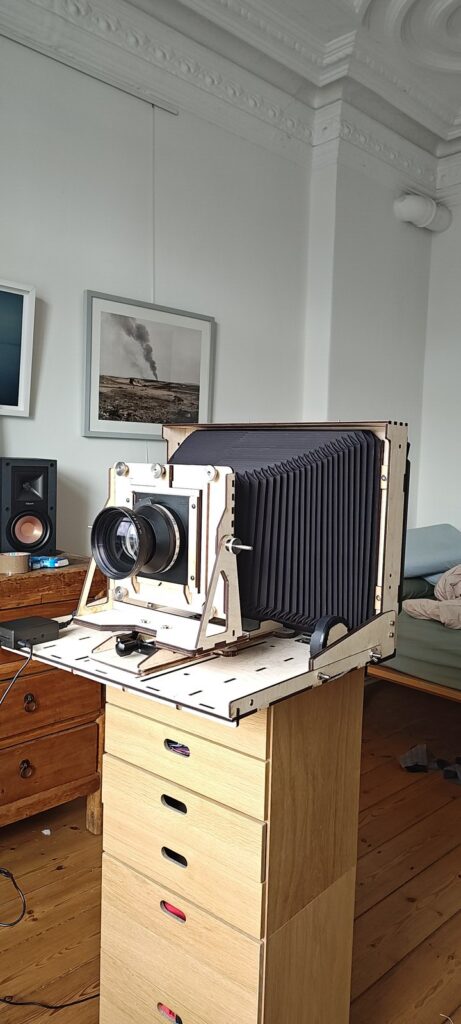
this is the thing i’ve been building for the last six weeks or so. it’s a large format camera: plywood body, bellows, a 300 mm lens [check: lens make] on the front. the back isn’t film and isn’t a digital back. it’s an epson perfection v300 flatbed scanner.
the idea isn’t new. people have been putting scanners behind lenses for years (“scanner camera”, “scanner back”). most of those builds take a canon lide or something similar, rip out the lamp, and live with whatever the stock driver does: one exposure, meant for paper lit by an led two millimetres away. that gives you very dark, very stripy images, unless you’re shooting into the sun.
i wanted to see how far you get when you stop living with the driver. turns out: pretty far, but you end up writing the driver.
the hardware
the v300 (sold as v30 without the transparency lid, as gt-s620 / gt-f720 inside epson) is a ccd scanner. a ccd scanner has a proper lens and mirror path inside, which matters: the sensor doesn’t touch the glass, it images the glass. so if you replace the scanner glass with a ground glass and let a big lens project onto it, the scanner’s own optics scan the ground glass from behind, line by line, like a very slow, very wide camera.
so the build is:
- the scanner, lid gone, in one of three setups (more on those below)
- a plywood body: 5 mm birch ply, laser cut, box joints. it holds the scanner at the back, a bellows, and a folding front bed with the lens standard on a sled (coarse focus) on top of a small optical stage (fine focus). the model still has a focusing hood on the back. the plan was to look at the ground glass through the scanner, but that needs a hole in the back of the scanner, and i dropped the idea. focusing happens on the screen instead (see the loupe, below).
- a raspberry pi 4 next to it, plugged into the scanner by usb. it runs everything; i use it from the browser on whatever device is around.
the body is generated, not drawn. a python script (gen.py) reads every measured number from one yaml file and writes the cut files, a nested layout for the laser bed (true-shape nesting, so small parts drop into the holes of big ones), a weight/stiffness estimate, and an interactive three.js model with hinges you can fold. when a measurement changed, i changed one number and regenerated, which happened a lot. 101 pieces, 62 different parts, four boards of 980 × 480.
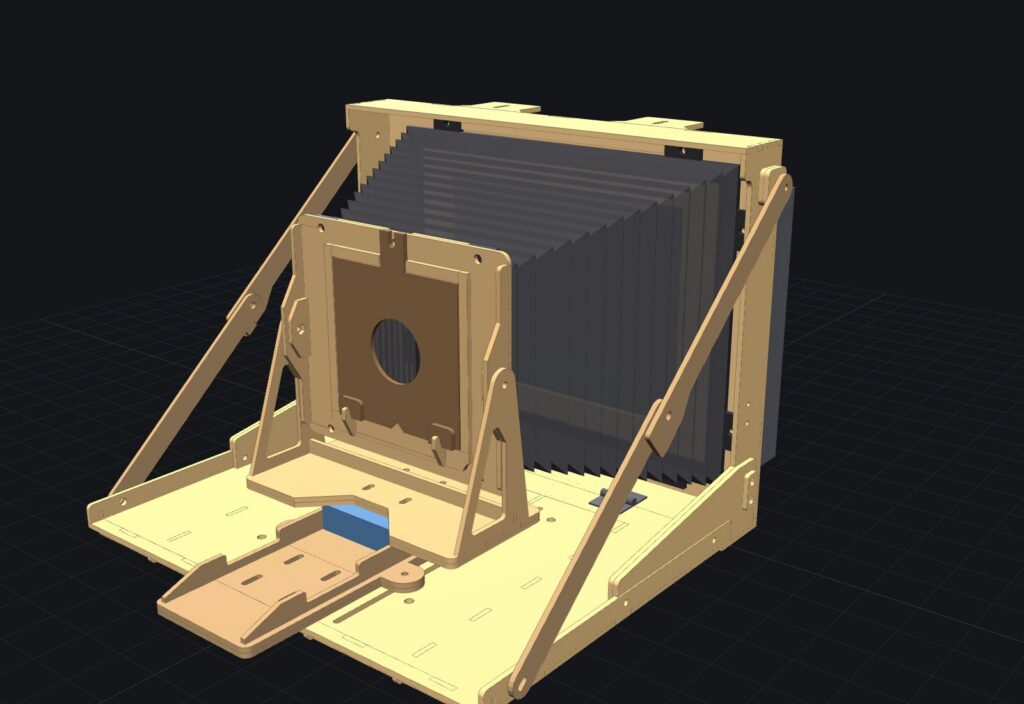
the real one looks like the model, mostly. the hinged front wings of the first version are now bolt-on braces, and the glued frame around the scanner came off once, so that got recut too.
three backs
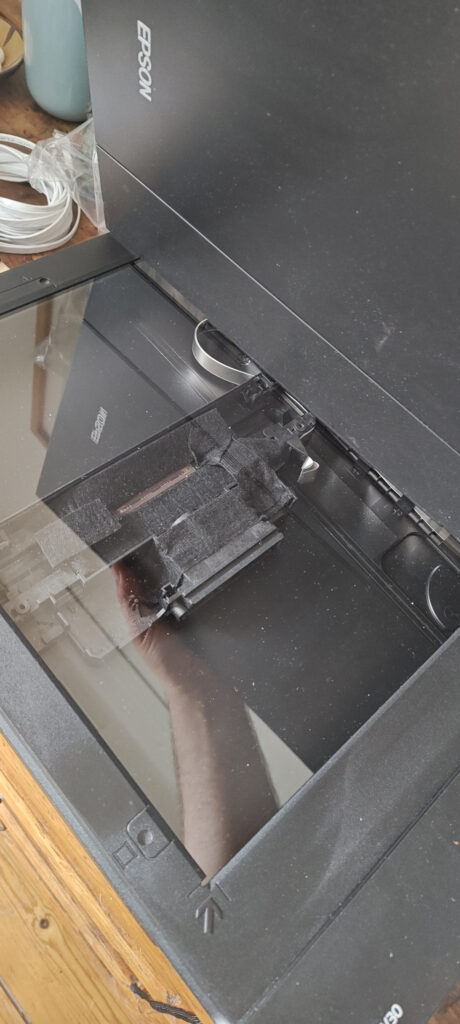
right now there are three versions of the back, and they all have their place:
- ground glass with a fresnel: the classic. the fresnel bends the light from the edges back towards the scanner’s lens, so the falloff is less brutal. the grain of the ground glass is in the picture, at 1200 dpi you see it.
- “heavy frost” with a fresnel: a frosted sheet instead of the ground glass. surprisingly, not noticeably darker, but much less grainy. that’s the one on the camera right now.
- no glass, no stock optics: the scanner’s lens and mirrors taken out, so the camera lens projects straight onto the bare ccd. no diffuser at all, the sharpest and brightest of the three. the catch: across the sensor, the pixels are now the ccd’s real pitch, about 4.2× finer than the step the motor makes along the bed. so the pixels come out rectangular, and the colours, which are three sensor rows a few lines apart, land at different gaps too. the app slows the sled down by the same factor to make them square again. that version also needed one more firmware change, see below.
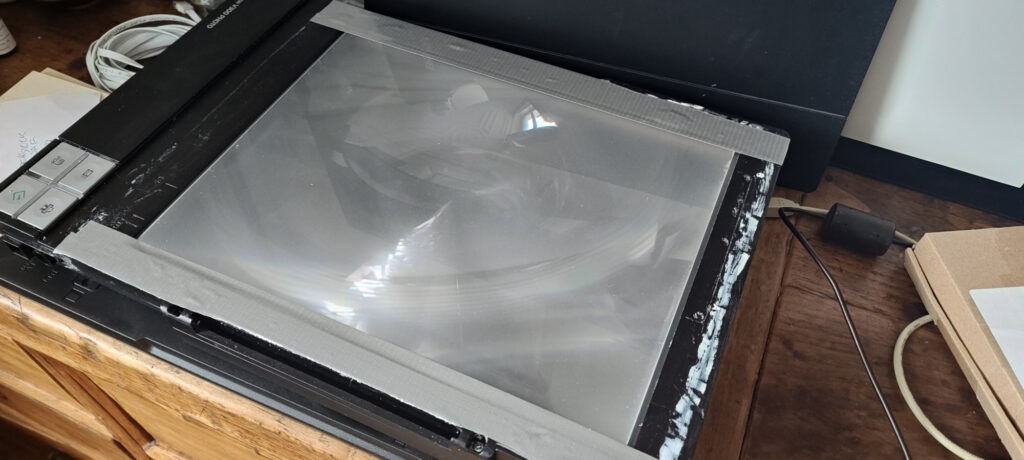
the real one looks like the model, mostly. the hinged front wings of the first version are now bolt-on braces, and the glued frame around the scanner came off once, so that got recut too.
the firmware
the fun part. the v300 has no firmware in flash. every time it powers up, the host uploads 64 kb of code over usb (epson’s file esfw8b.bin), and only then does it become a scanner. on linux that’s done by epson’s closed iscan plugin, which only exists for x86. so on a pi: nothing.
that also means the firmware is just a file i can read. decompiled it (ghidra plus a module for the epson s1c33 cpu it runs on), found the command dispatch table, the registers behind each command, the motor controller, the analog front end on a bit-banged spi bus. two things had to change:
- “v30 mode”: the v300 has a lid with its own motorised light carriage (for film). with the lid gone, the firmware tries to home that carriage, fails, and blinks orange forever. the v30 is the same board without the lid, selected by a hardware strap. so: one byte at body offset
0x46fe,ba 34→bc 34, and the firmware reads the strap as “v30”. the scanner then even calls itself gt-s620. - skip the light check: at startup the firmware checks the lamp brightness and refuses to run if it’s too low. in a camera, the light the sensor sees depends on the room. one more byte (
v30-dark).
the upload ends with a one-byte checksum (sum of the body, mod 256), so each patch also changes that.
i don’t distribute epson’s firmware, and the app doesn’t either. it wants your esfw8b.bin (from the iscan package), checks its sha256 against the stock file, applies the patch as (offset, expected old byte, new byte) triples, refusing if an old byte doesn’t match, recomputes the checksum and uploads that. nothing of epson’s is in the repo.
exposure
the scanner has no “exposure” setting. it has an led that’s on for a fixed time per line. with the led off, you get whatever arrives during one line period, which at 1200 dpi is a few milliseconds.
the first guesses were wrong in instructive ways. there’s a block of values that looked like a shutter (it’s a digital black offset). slowing down the line period alone gave brighter images that turned out to be a squashed image of a different part of the scene: the motor kept its speed, so each line covered more distance, and the sled ran into the end and sat there scanning the same line.
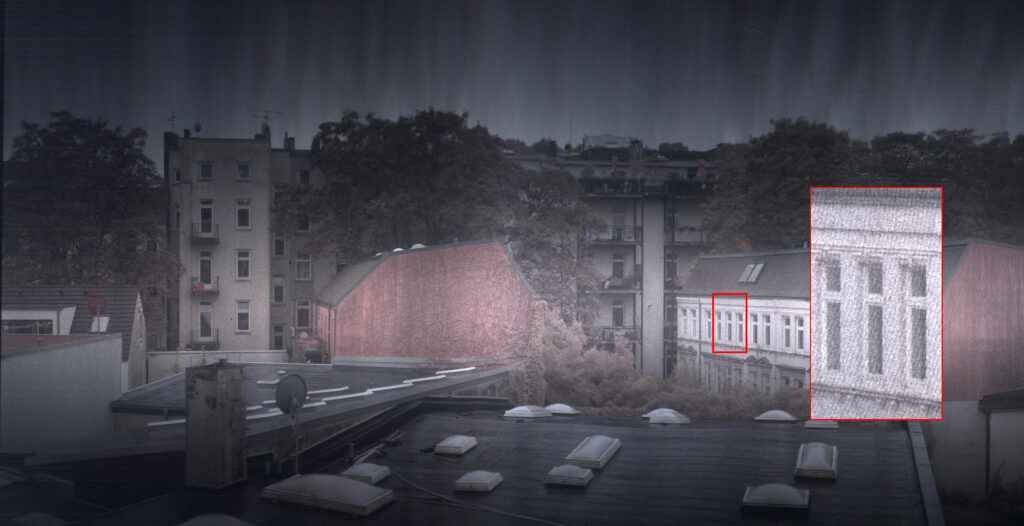
what works: the ccd integrates for one line period. so make the line period n times longer and the motor n times slower (its step periods live in a table the host uploads, in the same clock), and you get n times the light at the same geometry. measured linear from ×1 to ×64, with a lamp and paper and matching dark frames. the 47-minute scan below is ×24 at 1200 dpi.
long exposures bring their own problems: fixed-pattern dark current in coloured vertical stripes, proportional to n. that’s what the reference frames are for.
the driver
since the closed plugin is x86-only, the app talks to the scanner itself. go, no sane, no plugin: firmware upload, the command sequence for calibration and the scan, motor tables, and decoding the raw image blocks. to get there i patched epson’s (gpl) epkowa backend on my pc to log every usb byte the closed plugin sent, recorded “golden” sessions at every resolution, and decoded them:
- lines come as interleaved r, g, b 16-bit values plus an 8-byte trailer per block
- the colours are not aligned by the scanner. the three sensor lines sit a few lines apart, so red is shifted by two gaps, green by one
- at 4800 dpi the odd and even pixels come from two staggered sensor rows, 46.8 lines apart
- epson’s plugin quietly stretches every line by about 1.3 % to hit the nominal dpi. i don’t: the app keeps the raw pixels and writes the real pixel pitch into the file
the go driver replays the recorded command templates with the fields that matter filled in (area, resolution, gains, line period, motor table, shading table), and checks itself against the plugin’s output (correlation 0.995 at 300 dpi on the test scanner).
the app
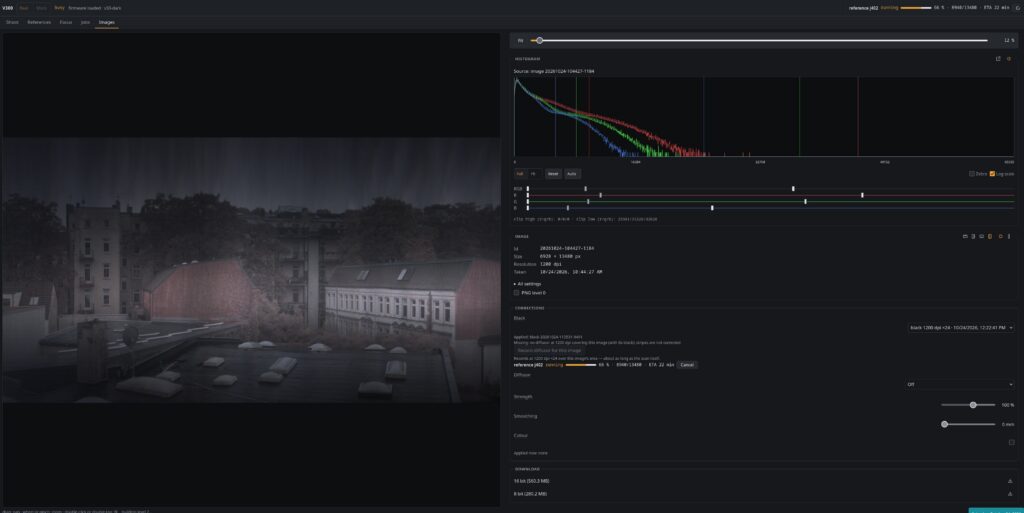
a go backend and an angular frontend, one binary on the pi. the workflow is the one i’d use with a real view camera:
- preview: a fast low-res pass of the whole ground glass
- loupe: pick small patches and scan them at full resolution, again and again, while turning the focus knob
- scan: the area you chose, at the resolution and exposure you chose, with live histogram and zebras while it comes in
- images: a tiled viewer (it’s 13,480 rows, you don’t load that as one jpeg), histogram and levels per image, downloads as 16-bit or 8-bit tiff
the stripes, and three images instead of one
a scanner behind a lens has every flaw a sensor can have, in one direction. every column of the ccd is a little more or less sensitive (3–4 %), so a plain scan has vertical stripes all the way down. the edges are darker than the middle, because the lens and the scanner’s own optics both fall off. and with long exposures, there’s the dark current.
so every proper image is really three:
- the scan itself
- a black: the same scan with a cap on the lens. pedestal plus dark stripes. subtracted.
- a diffusor: the same scan with white paper over the lens, evenly lit. that’s the falloff times each column’s sensitivity. divided by.
the classic flat field: (scan − black) / (diffusor − its black), normalised. i tried ten variants on the same three images before picking one, and the one that kills the stripes is the boring one: a black and a diffusor at the same resolution, pixel by pixel. anything smoothed takes the falloff but leaves the stripes.
the catch is that references have to match exactly: same resolution, gains, exposure, and the same analog offsets. those are calibrated by the scanner on the first scan after power-up and can come out one step different next time, and one step is about 125 counts of pedestal. so the app freezes them per session, stores them, and only pairs references with identical keys. today i learned that a power cycle in the middle of all this gives you a diffusor that has no matching black. so that’s next.
the corrections happen when you look at the image, not when it’s written. the stored scan stays raw. you can record a black or a diffusor after the scan, switch them on and off, change the strength, and the tiles, histogram and downloads follow.
a result
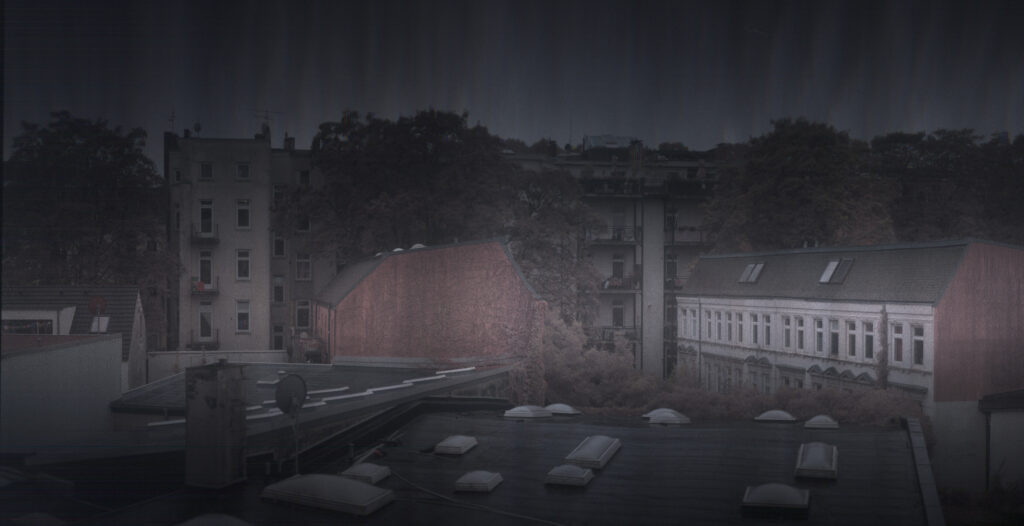
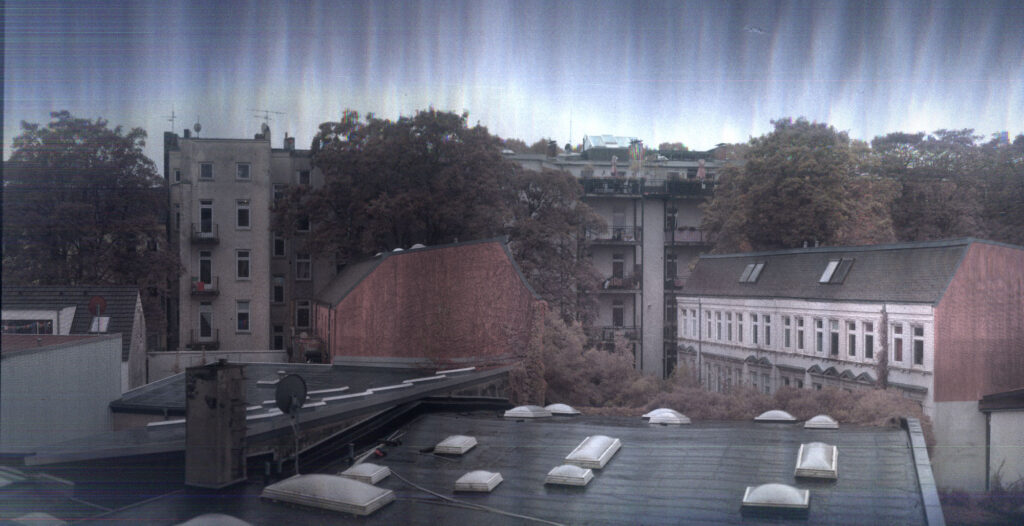
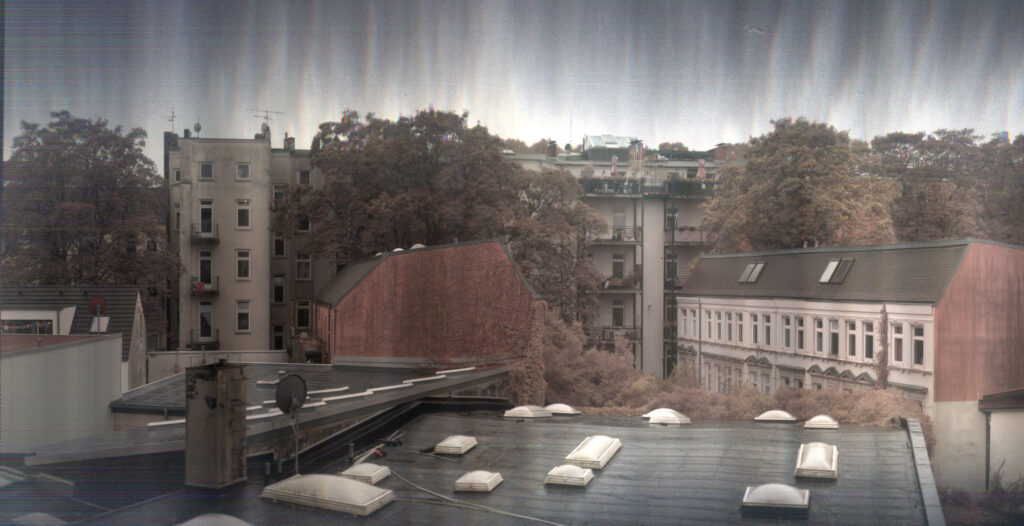
this is the view from my window, 6928 × 13480 pixels, before and after corrections.
what’s left
- keep the analog offsets across power cycles, so references survive
- a full-resolution corrected example (the references for this one are recording as i write this)
- the movement is slow. 47 minutes is fine for houses. trees in wind come out as watercolours.
- 2400 and 4800 dpi exist. at 4800 the motor table runs out at ×24.
the whole thing is about 33,000 lines of go and 19,000 of typescript, over 87 commits since mid september. drop me a line if you are interested.
full scale examples